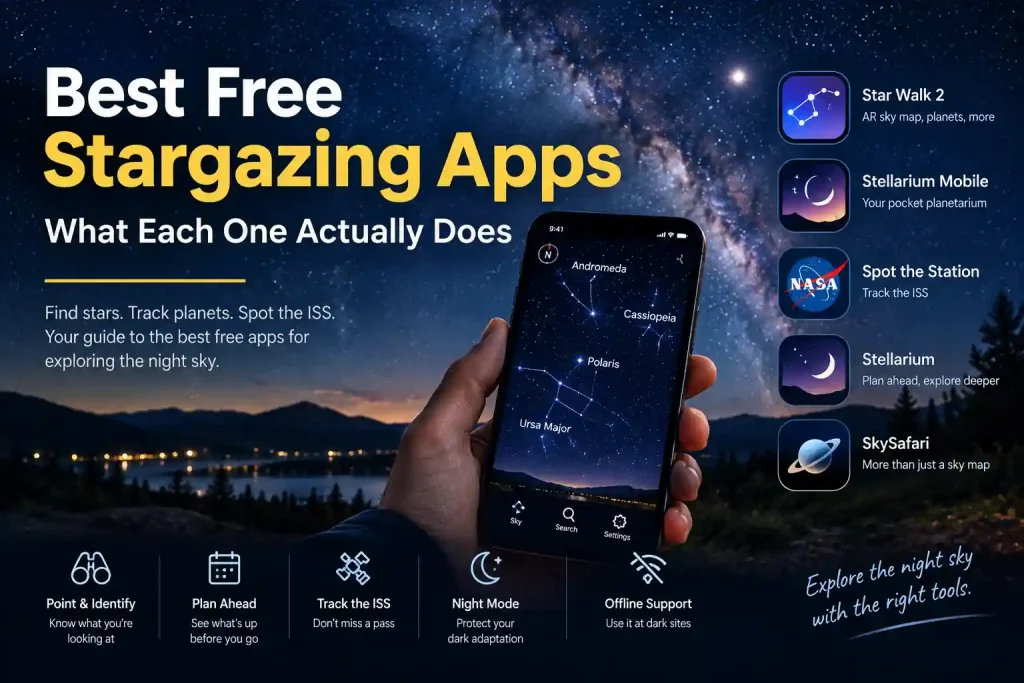
A stargazing app lets you point your phone at the sky and have it name the stars, planets, and constellations you are looking at in real time, using your phone's location, compass, and motion sensors. Several genuinely good ones are free: Stellarium Mobile, Star Walk 2, and NASA's own Spot the Station for the International Space Station. This guide describes what each one's own documentation says it does, grouped by what you actually need, rather than ranking them against each other on a scorecard nobody outside the app maker can verify.
Point-and-Identify Apps: Aim Your Phone, Get an Answer
If your only question tonight is "what is that," this is the category you want.
Star Walk 2, made by Vito Technology, centers on an interactive sky map with an AR mode: hold your device up and it overlays labels onto the real camera view of the sky above you. According to the developer, it also includes a Time Machine feature to see how the sky looked in the past or will look in the future, an Astronomy Calendar for upcoming events like meteor showers and conjunctions, and an Instant Learning feature that gives a short description, brightness, and distance for any object you tap. A Plus upgrade unlocks additional deep-sky objects and detailed planet models, but the free version covers the core point-and-identify function.
Stellarium Mobile, the phone companion to the long-running open-source Stellarium desktop planetarium, turns your device into what its makers describe as a handheld planetarium: point it at the sky and it identifies stars and planets using your phone's sensors, adjusting automatically as you move. Its star database is large by design, one of the points its developers highlight, and the mobile app carries over the same realistic-sky rendering approach as the desktop version.
Deep Planetarium and Reference Tools
If you want more than identification, these apps double as genuine research and planning tools.
Stellarium (desktop, also free and open source) renders a realistic 3D sky exactly as it would appear with the naked eye, binoculars, or a telescope, according to its own documentation, and lets you change time, date, and location to preview any sky from anywhere on Earth. It is a useful planning tool the night before a session, not just an in-the-moment identifier.
SkySafari, made by Simulation Curriculum, describes itself as a planetarium that fits in your pocket. Per its official app description, it includes an Orbit Mode that lets you travel to planets, moons, and stars, guided audio tours narrating the history and mythology behind objects, and a pronunciation guide for celestial names. Higher tiers (SkySafari 7 Plus and Pro, which are paid) add a deeper star catalog, offline operation, and the ability to control a computerized telescope directly from the app. The free/basic tier still covers core sky identification.
Tracking the ISS and Satellites
Spotting the International Space Station is one of the most satisfying naked-eye targets a beginner can find, and NASA maintains the official free tool for it.
NASA's Spot the Station is not a general planetarium app but a purpose-built notification service: it tells you the exact upcoming pass times for the ISS over your specific location, so you can be outside and looking the right direction at the right minute. Because the ISS moves fast and only appears for a few minutes at a time, a general-purpose sky app's "search for it yourself" approach is a poor substitute for a tool built specifically to alert you in advance.
What Every Good Stargazing App Has in Common
Whichever one you pick, look for these features, since they show up across the apps worth using:
- A red or night mode. Checking your phone under a bright white screen undoes the dark adaptation your eyes just spent 20-plus minutes building; see our full explanation in dark adaptation and red light. A genuine night mode dims and shifts the display toward red rather than just lowering brightness.
- AR point-to-sky. Holding the phone up and seeing labels appear over the real sky, rather than browsing a static star chart, is what makes these apps faster than a printed chart for a total beginner.
- A time-travel or "sky at a different time" view. Useful for planning a session before you leave the house, not just narrating it once you are outside.
- Offline capability, at least for the core star map, since you may be at a dark site with no signal.
Which Type Fits Your First Night
You do not need to download all of these. Match the tool to what you are actually doing tonight:
- First time outside, just want to know what you're looking at: Star Walk 2 or Stellarium Mobile, either free tier.
- Planning ahead, want to know what will be up before you leave the house: Stellarium desktop, or SkySafari's time controls.
- Specifically trying to catch the ISS: skip the general apps and use NASA's Spot the Station directly.
- You've caught the bug and want deep-sky planning, telescope control, or offline reference: SkySafari's paid tiers are built for that, per the developer's own tier breakdown.
None of this requires spending money to get started. If you are completely new to the hobby, our beginner's guide to starting stargazing covers what to expect before you even open an app, and once you know your sky's darkness level (see our guide to the Bortle scale), an app becomes much more useful for planning realistic targets like the Milky Way rather than aiming for objects your sky is too bright to show.
Frequently Asked Questions
Are free stargazing apps accurate?
The core sky-mapping function (where stars, planets, and constellations currently sit in the sky from your location) relies on well-established astronomical calculations and is generally reliable across the major apps. Accuracy issues usually come from phone compass/sensor calibration, not the underlying app data.
Do I need to pay for a stargazing app to get started?
No. Star Walk 2 and Stellarium Mobile both offer free tiers that cover point-and-identify use, and NASA's Spot the Station is entirely free. Paid tiers mainly add deeper catalogs, offline packs, telescope control, and extra reference content.
Will a stargazing app drain my phone battery quickly?
Continuous GPS and compass use for AR mode does use more battery than typical apps. Most apps offer a non-AR, static sky-chart mode that is lighter on battery if you are planning a long session.
Do these apps work without an internet connection?
Core star-map data in Stellarium and similar planetarium apps is generally stored on-device and works offline once installed, which matters at dark sites with no signal. Always check the specific app's own documentation before relying on this away from home, since features vary by app and version.
Which app should a total beginner start with?
Any point-and-identify app with a red/night mode is a reasonable starting point; Star Walk 2 and Stellarium Mobile both fit that description per their own developer documentation. Pick whichever interface feels more comfortable to you, since the underlying sky data is fundamentally the same astronomy.